




Caught in the Web: Understanding and Combatting Online Threats
Kelly McCaddin, Operations Associate | Sally Eisenberg, Operations & Client Service Advisor | September 17, 2026
In today’s digital world, cybersecurity is no longer just for tech experts and big businesses. Cyber criminals continue to target everyday folks by utilizing any personal information they can get their hands on – including email, online banking, and unsecured internet networks. Check out the quiz below to see where you land on combatting these criminals and maybe even pick up some new tips along the way.
Which of the following is considered the most secure and effective for managing passwords?
A. Using the same complex password across all accounts. It’s easier to memorize and reduces the risk of forgetting it.
B. Using a reputable password manager to generate and store unique, strong credentials for each separate login.
C. Writing passwords down on a sticky note that is kept next to your keyboard so you won’t lose it.
D. Setting a reminder to change your primary password every 30 days to a slightly modified variation of your previous password.
Reveal the correct answer!
Correct Answer: B
A password manager can make it easy to use distinct, strong credentials for every single application without needing to memorize them all. Always avoid using easily guessed credentials such as “Password123” or anything that resembles your name or email address. It’s also important to NOT save passwords in your web browser as this can make them accessible to malware attacks. Lastly, always enable multi-factor authentication (MFA) whenever available, as this is one of the best ways to enhance your security. You can learn about setting up your Schwab MFA here, or your Fidelity MFA here.
You decide to visit a local coffee shop to get out of the house and get some work done. You see the shop has their own free Wi-Fi network and connect. What’s the cybersecurity reality check here?
A. Nothing to worry about. The Wi-Fi is likely safe- it’s a nice place with festive fun drinks.
B. It’s ok as long as your computer’s Bluetooth is turned off. This will eliminate the risk of any nearby pairing requests.
C. You’re likely (and unknowingly) broadcasting your private data to any potential hacker within the Wi-Fi radius.
D. It’s not ideal, but as long as you don’t look at sketchy websites or click on weird links, your data will remain protected.
Reveal the correct answer!
Correct answer: C
Open, unencrypted public Wi-Fi networks often lack virus protection and are highly susceptible to attacks. When in a public setting, it’s always best to use a secure VPN or your phone’s cellular hotspot. If you must use public Wi-Fi always exercise caution and NEVER directly access confidential personal data.
A viral social media trend asks for “First pet’s name, the elementary school you attended, and your mother’s maiden name”. In return, it will generate your cool superhero name. What is actually happening here?
A. Mark Zuckerberg and his team at Meta are genuinely curious about your vigilante persona.
B. You are about to get an exclusive coupon for a free smoothie –Yum!
C. It’s a harmless way to connect with others based on the mutual love of comic books.
D. You are casually handing over the answers to your login security questions.
Reveal the correct answer!
Correct answer: D.
Those cute questionnaires are often low-effort social engineering tools designed to harvest answers for account password resets. It is important to limit disclosure and not share any unnecessary personal details on social media or other platforms. Personal information put out on the internet for well-intended purposes can be gathered and used against you by cyber criminals. Remember to periodically audit your digital footprint and leverage privacy settings when available.
You receive an email from a well-known anti-virus company stating that your subscription is expiring. To ensure you stay protected, you are urged to immediately click a link to confirm your account details. What is the most definitive indicator that this is a phishing attempt?
A. The email includes your correctly spelled first and last name.
B. The message includes a professional signature block with an accurate corporate logo.
C. The message was sent during standard business hours.
D. The sender’s display name says the vendor, but the actual underlying email address is a free webmail or misspelled domain.
Reveal the correct answer!
Correct answer: D
Unfortunately, attackers can easily spoof display names and company graphics, but by taking a close look at the sender domain, it can often reveal its true unauthorized origin. Although scammers are getting sneakier, often times phishing emails come from free webmail, misspelled, or odd-looking domains (ex: mikrosoft-legit-account@no_virus-xxnet.99). We encourage you to always be suspicious of unsolicited emails and calls, especially those that suggest immediate action is required to avoid consequences. If you’re unsure about a sender’s domain, best practices would be to check their website or give them a call.
You receive an unexpected call or message from someone claiming to be technical support. They let you know there is an error on your computer, and they ask you to install remote-access software so they can “fix” the issue. What is the safest course of action?
A. Immediately share your screen and give them control so that everything is resolved quickly.
B. Ask them for their name and astrological sign. Everyone knows you can trust an Aquarius when it comes to technology.
C. Follow their step-by-step instructions while recording the session.
D. Hang up or ignore the message.
Reveal the correct answer!
Correct Answer: D
Unsolicited communication should always put you on high alert. Never give an unverified individual remote access to your computer after receiving a call email or pop-up request to do so. Although the person on the other line my claim to be from a known company (Google, Apple, your internet provider, etc.) these are often scams.
You have gone through your logins and made sure Multi-Factor Authentication (MFA) is enabled whenever available. What does this mean for your digital security?
A. You’ve disabled hacker’s password mechanisms, and they now have to your biometric signatures instead.
B. Even if an attacker acquires a valid username and password pair, they cannot log in without the dynamic secondary factor.
C. Your password length requirements will automatically be increased to 26 characters and 3 symbols.
D. Internet traffic from foreign countries will automatically be blocked.
Reveal the correct answer!
Correct Answer: B
MFA adds an independent layer of security, making leaked credentials insufficient for unauthorized access. As MFA can protect against phishing, social engineering, and brute-force attacks, it is widely known as one of the easiest and most effective tools to protect yourself online. Research by Microsoft showed that MFA can block more than 99.2% of account compromise attacks, so remember to turn it on whenever available.
Why is regularly backing up important files important for cybersecurity?
A. It improves internet speed.
B. It protects your files if they are lost, deleted, or affected by ransomware.
C. It makes it easier to send to people who need it without a password.
D. You just really love copies.
Reveal the correct answer!
Correct answer: B
Regular backups keep copies of important files safe. If your files are accidentally deleted, lost, damaged, or locked by ransomware, you can restore them from a backup instead of losing them permanently.
Why is keeping your devices and software up to date important for cybersecurity?
A. It is more aesthetically pleasing.
B. It is not important to keep your devices and software up to date.
C. If my devices are updated, I can use the same passwords everywhere.
D. It helps fix security vulnerabilities and protect against cyber threats.
Reveal the correct answer!
Correct answer: D
Software updates often fix security vulnerabilities that cybercriminals look to take advantage of. Keeping your devices and software up to date helps protect your information from malware, hacking, and other cyber threats.
Which of the following is NOT a common scam cybercriminals run?
A. Phishing
B. Smishing
C. Lishing
D. Quishing
E. Vishing
Reveal the correct answer!
Correct answer: C
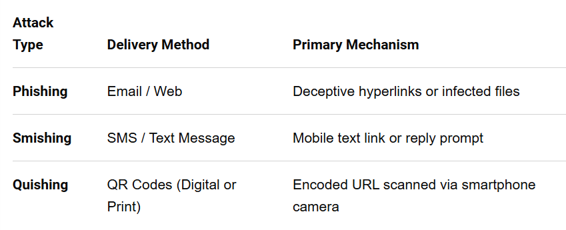
Phishing, smishing, and quishing are all social engineering cyberattacks designed to steal your personal data, credentials, or money by tricking you into trusting a fake source. See a breakdown here:
When it comes to cybersecurity, the little things start to add up. By testing your knowledge and staying informed about common cyber threats, you can prepare and protect yourself and others. Cybersecurity is everyone’s responsibility and doesn’t consist of one-offs, but instead highlights the importance of ongoing, good habits. Weatherly is always available to be a resource for any questions you may have. For additional information, check out our 7 steps to better cybersecurity.
** The information provided should not be interpreted as a recommendation; no aspects of your individual financial situation were considered. Weatherly is a registered investment advisor and does not provide legal advice. Always consult your trusted financial and legal professionals before implementing any strategies derived from the information above. This blog was developed with the assistance of artificial intelligence (“AI”) tools. These tools were used to help generate initial outlines, organize ideas, and improve efficiency in communication and grammar.